
In 2026, Google Colab notebooks have evolved from a simple cloud-based coding playground into a serious productivity tool for students, data scientists, and even SEO professionals who rely on Python for automation.
This guide is designed to bridge three audiences at once:
- Beginners learning Python and notebooks
- Power users who care about GPU/TPU performance
- SEO and digital marketing professionals using Colab for automation and analysis
Related Blogs:
What Is a Colab Notebook?
A Colab notebook is a cloud-hosted, interactive coding environment provided by Google. It allows you to write and execute Python code directly in your browser—without installing anything locally.
Under the hood, Colab is built on the same concept as a Jupyter Notebook, but with added advantages like free cloud compute, collaboration, and hardware acceleration.
Each notebook (.ipynb file) consists of:
- Code cells → where you write and run Python
- Text (Markdown) cells → where you explain results or document logic
Why Use Google Colab in 2026?
1. Zero Setup, Fully Cloud-Based
You only need a browser and a Google account. No local Python, no dependency conflicts.
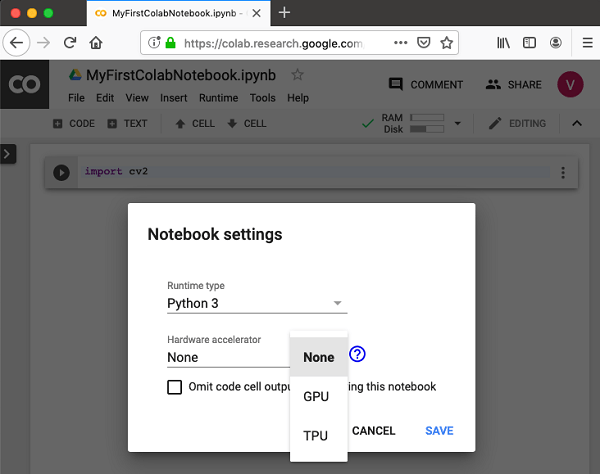
2. Free GPU & TPU Access
Colab gives limited free access to GPUs and TPUs—critical for ML workflows.
Common hardware options include:
- NVIDIA T4 / L4 GPUs
- TPUs for deep learning experiments
For extended usage, Colab Pro and Pro+ offer longer runtimes and priority access.
3. Seamless Google Ecosystem Integration
Colab works natively with Google Drive, making it easy to store notebooks, datasets, and outputs.
4. Collaboration Like Google Docs
Multiple users can edit the same notebook simultaneously—ideal for teams and classrooms.
How to Set Up and Run Your First Colab Notebook

Step 1: Create a Notebook
Go to colab.research.google.com → “New Notebook”
Step 2: Write Your First Python Code
print("Hello, Google Colab!")
Step 3: Run the Cell
Click ▶️ or press Shift + Enter
Step 4: Connect Colab to Google Drive
from google.colab import drive
drive.mount('/content/drive')
This allows persistent storage for files and scripts.
Colab vs Jupyter Notebook: What’s the Difference?
| Feature | Google Colab | Jupyter Notebook |
|---|---|---|
| Setup | None | Manual |
| GPU/TPU | Yes (cloud) | Local only |
| Collaboration | Real-time | Limited |
| Internet Access | Enabled | Depends on setup |
| Best For | Cloud workflows | Local development |
👉 In short: Colab = convenience + scale, Jupyter = control + offline use.
Advanced Features: AI-Assisted Coding with Gemini

In 2026, Colab integrates tightly with Gemini, turning notebooks into AI-augmented development environments.
Key AI features include:
- Auto-generating Python code from comments
- Explaining complex ML cells in plain English
- Debugging and refactoring suggestions
This is especially useful for non-developers (like SEO analysts) who know what they want but not always how to code it efficiently.
Using Google Colab for SEO Automation (High-Value Use Case)

This is where Colab becomes strategic, not just technical.
Why SEO Professionals Are Adopting Colab
- Handle 10,000+ keywords without Excel crashing
- Automate repetitive SEO tasks
- Build reusable notebooks instead of manual workflows
Popular SEO Tasks in Colab
- Keyword clustering using NLP
- SERP overlap analysis
- Bulk Google Trends comparisons
- Search intent classification
- Competitor keyword gap analysis
All powered by Python libraries like pandas, scikit-learn, and spaCy.
Example: Keyword Clustering in Colab (Conceptual Flow)
Keywords CSV
   ↓
Text Cleaning (Python)
   ↓
Vectorization (TF-IDF / Embeddings)
   ↓
Clustering (K-Means / HDBSCAN)
   ↓
SEO-Friendly Keyword Groups
This workflow is nearly impossible to execute efficiently in spreadsheets—but trivial in Colab.
Frequently Asked Questions
Is Google Colab notebook free?
Yes. The free tier includes limited CPU/GPU usage. Paid plans offer longer runtimes and faster hardware.
How long can a Colab notebook run?
- Free: ~12 hours (idle disconnects sooner)
- Pro/Pro+: extended runtimes
Can I install custom libraries in Colab?
Yes.
!pip install pandas scikit-learn
Is Colab safe for professional work?
Yes, but avoid uploading sensitive credentials directly. Use environment variables or Drive-based configs.
Final Thoughts: When Should You Use a Colab Notebook?
Use Google Colab if you want:
- Fast experimentation
- Cloud-based Python execution
- AI-assisted coding
- Scalable SEO or ML workflows
Avoid it only if you need:
- Offline access
- Custom system-level configurations