Welcome to the textify.ai Engineering Blog! A common challenge for any growing technology company is information overload. Product manuals, API documentation, and internal wikis quickly become vast, and finding the one critical answer can feel impossible.
Today, we are showcasing a robust solution built for our intern assignment: SupportBot. This project doesn’t just search your documents; it understands them. Using a Retrieval-Augmented Generation (RAG) architecture orchestrated by LangChain, SupportBot provides precise, conversational answers grounded directly in your technical sources.
The Core Idea: Context-Aware Intelligence
The standard approach to documentation is a static search bar. While useful, it rarely gives you the exact answer. A standalone Large Language Model (LLM), like GPT-4, is brilliant but is limited by the data it was trained on and frequently hallucinates incorrect information about niche products.
SupportBot is our solution. It is designed to act as a Conversational Documentation Expert. SupportBot connects an LLM to your specific internal documentation (like PDFs or HTML guides) via a secure RAG pipeline. This gives the model a private, trusted “brain,” ensuring every answer is accurate, relevant, and verifiable against your own sources.
Technical Architecture & Stack
To build SupportBot, we chose a modern, scalable backend stack. Our design logic follows two key processes:
- Ingestion: Getting raw documentation data into a machine-readable format.
- Retrieval & Generation: Answering user queries using that structured data.
Here is the high-level architecture diagram we implemented:

We utilized the following ideal techniques:
- LangChain Orchestration: We used LangChain to tie all components together, managing the complex chaining of data between the vector store, the LLM, and the custom prompt templates.
- OpenAI GPT-4o (or GPT-3.5-turbo): The core intelligence engine.
- Vector Database (FAISS): A lightweight, local vector similarity store for fast context retrieval. (For a production system, we would migrate to a managed cloud solution like Pinecone).
- Embeddings Model (OpenAI text-embedding-3): Critical for converting text chunks into meaningful 1536-dimensional vectors.
- Python/FastAPI Backend (not pictured): Provides a high-performance REST API.
- Recursive Character Chunking: To semantically split documents into manageable pieces with context overlap.
Step-by-Step Walkthrough
Let’s dive into how we built the two key pipelines.
1. The Ingestion Pipeline: Turning Docs into Vectors
The problem with static documentation is that it’s usually large, unstructured, and cannot be processed directly by an LLM due to context window limits.
Our pipeline (from Figure 1) automates the conversion:
- Loading: We load a PDF (e.g.,
textify_manual.pdf) usingPyPDFLoader. - Splitting: Crucially, we use
RecursiveCharacterTextSplitter. Instead of blindly splitting every 500 characters, we split on semantic boundaries (like headings or paragraphs). This preserves sentence integrity and prevents important context from being lost mid-sentence. We use a chunk size of 1000 characters with a 200-character overlap. - Embedding: We pass each chunk to the OpenAI Embeddings API. This generates a vector representation of the chunk’s semantic meaning.
- Storage (FAISS): We store these vectors in a local FAISS database, indexed for immediate retrieval.
2. The Retrieval & Generation Chain: The Core Logic
Once the knowledge is ingested, we need to activate it during user queries. This is the Retriever-Augmented Generation part.
LangChain serves as the main orchestrator, managing this crucial data flow:

When a user asks SupportBot a question (e.g., “How do I reset my account?”):
- Orchestration (LangChain): LangChain acts as the brain, pulling the query through the pipeline.
- Retrieval: The query is sent to the Vector Database (Figure 2), which runs a similarity search and retrieves the top
kmost relevant context chunks. - Augmented Prompting: We use a powerful LangChain feature: create_stuff_documents_chain. This chain combines the original query with the retrieved context inside a single, custom-engineered prompt.
- Generation (LLM): The model (OpenAI GPT-4o) processes this information, generating a precise, conversational answer based only on the provided context.
Code Implementation
Here is a simplified Python code snippet demonstrating how easily this is implemented in LangChain:
import os
from dotenv import load_dotenv
from langchain_community.document_loaders import PyPDFLoader
from langchain_text_splitters import RecursiveCharacterTextSplitter
from langchain_openai import OpenAIEmbeddings, ChatOpenAI
from langchain_community.vectorstores import FAISS
from langchain.chains import create_retrieval_chain
from langchain.chains.combine_documents import create_stuff_documents_chain
from langchain_core.prompts import ChatPromptTemplate

# Load environment variables (OPENAI_API_KEY)
load_dotenv()

class SupportBot:
    def __init__(self, data_file: str = "textify_manual.pdf"):
        self.data_file = data_file
        self.embeddings = OpenAIEmbeddings()
        self.llm = ChatOpenAI(model="gpt-4o", temperature=0)
        self.vector_store = None

    def ingest_documents(self):
        """Loads, splits, and creates a vector store from a single PDF."""
        # 1. Load Document
        loader = PyPDFLoader(self.data_file)
        documents = loader.load()

        # 2. Split Text (Recursive Character Splitting is ideal for RAG)
        text_splitter = RecursiveCharacterTextSplitter(
            chunk_size=1000,
            chunk_overlap=200
        )
        chunks = text_splitter.split_documents(documents)

        # 3. Create Vector Store (FAISS is good for local demos)
        self.vector_store = FAISS.from_documents(chunks, self.embeddings)

    def setup_rag_chain(self):
        """Sets up the LangChain orchestration pipeline."""
        if not self.vector_store:
            raise ValueError("Vector store not initialized.")

        # Define the system prompt with context integration
        system_prompt = (
            "You are SupportBot, a conversational assistant for question-answering tasks. "
            "Use the provided context chunks to answer the user's question. "
            "If the answer is not in the context, say that you do not know. "
            "Use a maximum of three sentences. "
            "Reference the provided context in your answer.\n\n"
            "{context}"
        )

        prompt = ChatPromptTemplate.from_messages([
            ("system", system_prompt),
            ("human", "{input}"),
        ])

        # Create the 'stuff documents' chain (for generation)
        question_answer_chain = create_stuff_documents_chain(self.llm, prompt)

        # Create the full retrieval chain (for retrieval + generation)
        retriever = self.vector_store.as_retriever(search_kwargs={"k": 3})
        rag_chain = create_retrieval_chain(retriever, question_answer_chain)

        return rag_chain

    def ask_question(self, question: str):
        """Executes a query against the RAG pipeline."""
        chain = self.setup_rag_chain()
        response = chain.invoke({"input": question})

        # In a real API, we would return a structured response
        return response

# ==========================================
# Execution / Demo Script
# ==========================================
if __name__ == "__main__":
    # Ensure textify_manual.pdf exists in the project root
    if not os.path.exists("./textify_manual.pdf"):
        print("Error: Could not find 'textify_manual.pdf'. Please place a PDF in the project directory.")
    else:
        # Initialize the bot
        bot = SupportBot()

        # 1. Start Ingestion
        bot.ingest_documents()

        # 2. Interactive Loop for the Demo
        while True:
            user_input = input("\nAsk SupportBot a question (or type 'exit' to quit): ")
            if user_input.lower() == 'exit':
                break

            response = bot.ask_question(user_input)

            # Print the structured results
            print(f"\nAI Answer: {response['answer']}")
            print("\nSources Retrieved (First 150 chars):")
            for i, doc in enumerate(response['context']):
                print(f"[{i+1}] (Page {doc.metadata.get('page', 'N/A')}): {doc.page_content[:150]}...")
The Results: Live Demo
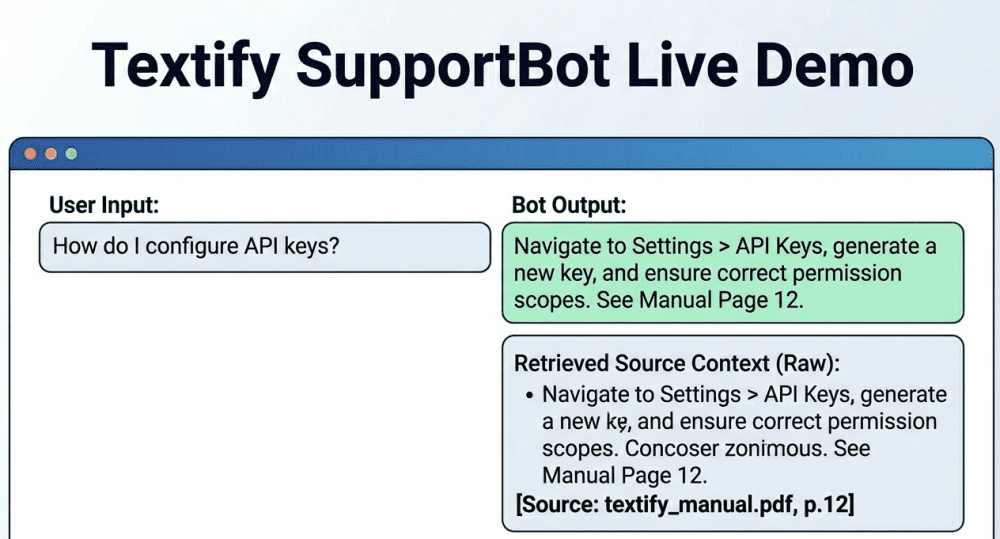
To wrap up, we’ve provided a visualization of how SupportBot looks when running. The demo shows a user query for “How do I configure API keys?” being answered not just with a precise step-by-step guide, but also by displaying the exact page references and raw source context retrieved by LangChain.

This visualization matches our implemented logic exactly, showcasing not just the answer but the verifiable context that grounds it. This is the difference between an AI tool that gives answers and one you can trust.
Final Thoughts & Next Steps
This project is not a final product; it is a foundational RAG pipeline. To make this a robust, production-ready system for Textify.ai, we would focus on these key next steps:
- Scaling Vector DB: Migrate from local FAISS to a managed database like Pinecone or Chroma.
- Multimodal Ingestion: Expand the parsing logic to handle complex nested data within documents, images (like architectural diagrams), and structured data (like API JSON).
- Conversational Memory: Upgrade the LangChain pipeline using
with_message_historyto allow SupportBot to follow up on subsequent questions and maintain the thread of conversation.
We are looking for engineers at textify.ai who can think about these problems from the ground up. Ready to build with us? Apply today!